From "State/Effect Hell" to motif-ts: A Better Way to Orchestrate Workflows
Managing complex workflows with `useState` and `useEffect` can be brittle. motif-ts provides a framework for multi-step workflows with co-location, immutability, and rock-solid type safety.
The "State/Effect Hell" in Frontend Development
Building multi-step flows—user registration, checkout processes, or complex wizards—often introduces a familiar architectural challenge. Starting with a few useState hooks, components rapidly evolve into something far less maintainable:
// The classic "state / effect hell"
const [step, setStep] = useState(1);
const [userData, setUserData] = useState({});
const [paymentData, setPaymentData] = useState({});
const [isLoading, setIsLoading] = useState(false);
const [error, setError] = useState(null);
const [timer, setTimer] = useState(60);

// useEffect hell starts here...
useEffect(() => {
  if (step === 2) {
    const interval = setInterval(() => {
      setTimer((t) => t - 1);
    }, 1000);
    return () => clearInterval(interval);
  }
}, [step]);

useEffect(() => {
  if (timer === 0 && step === 2) {
    handleTimeout();
  }
}, [timer, step]);

const handleNext = async () => {
  if (step === 1) {
    // Validate individual fields...
    setStep(2);
  } else if (step === 2) {
    // Process payment...
    try {
      setIsLoading(true);
      await processPayment(paymentData);
      setStep(3);
    } catch (e) {
      setError(e);
    } finally {
      setIsLoading(false);
    }
  }
  // ... and development complexity grows.
};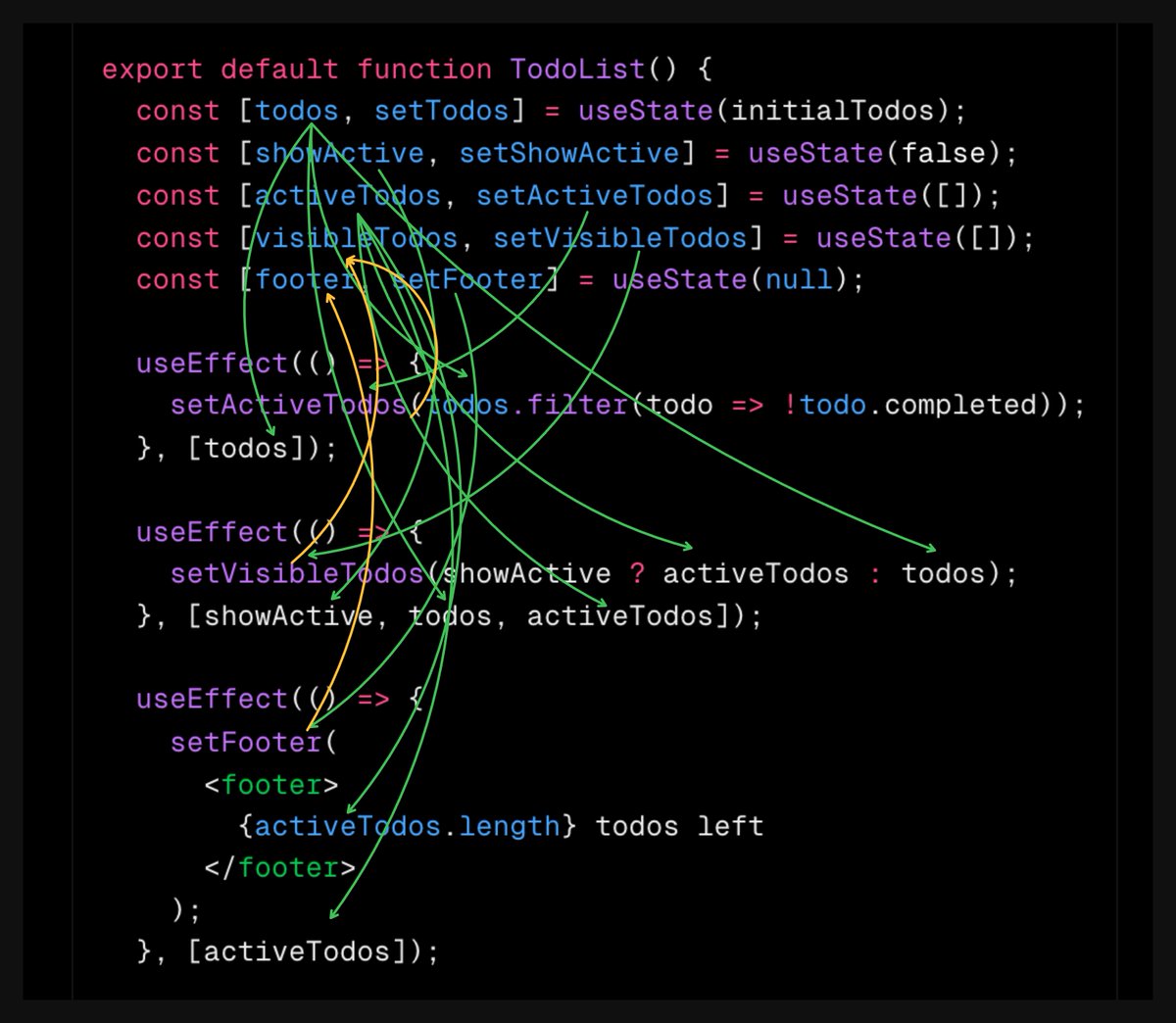
As the image highlights, the root of the problem is often the useEffect + setState loop.
When state B depends on state A via an effect, it creates a fragile, "pull-based" dependency chain. This leads to recursive updates, race conditions, and a codebase that is difficult to test or refactor.
The goal should be to move away from "syncing states with effects" and toward a unified state machine where the entire workflow is a first-class citizen.
That’s why motif-ts was built.
What Makes motif-ts Different?
Instead of scattering logic across various hooks and effects, motif-ts focuses on three "killer features" that make complex flows manageable.
1. The Power of Co-location
Standard development often involves jumping between a schema file, a state file, and a React component when working on a single step.
With motif-ts, everything belonging to a step is co-located.
import { step } from '@motif-ts/core';
import z from 'zod';
import { type StateCreator } from 'zustand/vanilla';

// Local state definition — co-located with the step
interface VerifyState {
  isChecking: boolean;
  timeLeft: number;
  decrement: () => void;
  setChecking: (checking: boolean) => void;
}

const verifyStore: StateCreator<VerifyState> = (set) => ({
  isChecking: false,
  timeLeft: 60,
  decrement: () => set((s) => ({ timeLeft: Math.max(0, s.timeLeft - 1) })),
  setChecking: (isChecking) => set({ isChecking }),
});

// The step: schema, state, lifecycle, and API — all in one place
const VerifyEmail = step(
  {
    kind: 'VerifyEmail',
    inputSchema: z.object({ email: z.string() }),
    outputSchema: z.object({ verified: z.boolean() }),
    createStore: verifyStore,
  },
  ({ input, next, store, transitionIn, effect }) => {
    // Lifecycle: Start countdown on entry
    transitionIn(() => {
      const interval = setInterval(() => store.decrement(), 1000);
      return () => clearInterval(interval); // Cleanup on exit
    });

    // Effect: React to state changes
    effect(() => {
      if (store.timeLeft === 0) {
        console.log('Verification timed out for:', input.email);
      }
    }, [store.timeLeft]);

    // API exposed to UI
    return {
      timeLeft: store.timeLeft,
      isChecking: store.isChecking,
      verify: async () => {
        store.setChecking(true);
        await new Promise((r) => setTimeout(r, 1000));
        const isValid = input.email.endsWith('@company.com');
        store.setChecking(false);
        next({ verified: isValid });
      },
    };
  },
);
Looking at this file, the step's requirements, output, internal timer, and verification logic are immediately clear. It functions as a self-contained unit of logic.
2. Immutability: Predictability by Default
Debugging state transitions is difficult when mutations occur unpredictably. motif-ts uses Zustand under the hood to enforce immutable updates.
Because every state change provides an immutable snapshot, time-travel debugging becomes possible. Inspecting the history of a workflow, jumping back to a previous step, or replaying actions helps identify exactly where issues arise.
3. Rock-solid Type Safety (No More Runtime Surprises)
Passing data between screens often relies on any or loose objects. In motif-ts, every step is gated by a Zod schema.
TypeScript provides immediate feedback if outputs do not match expected inputs. Runtime validation further ensures that the input inside step logic is precisely as expected.
Orchestrating the Flow
Defining a workflow as a graph makes the application flow declarative rather than procedural.
import { workflow } from '@motif-ts/core';
import { devtools } from '@motif-ts/middleware';

// Define steps
const CollectEmail = step(
  {
    kind: 'CollectEmail',
    outputSchema: z.object({ email: z.string().email() }),
  },
  ({ next }) => ({
    submit: (email: string) => next({ email }),
  }),
);

// Create workflow
const orchestrator = workflow([CollectEmail, VerifyEmail]);

// Instantiate and connect
const collect = CollectEmail('collect');
const verify = VerifyEmail('verify');

orchestrator.register([collect, verify]);
orchestrator.connect(collect, verify);

// Add DevTools for time-travel debugging and start
const app = devtools(orchestrator);
app.start(collect);
Clean UI Components (and they're UI-Agnostic)
Moving business logic into motif-ts transforms the UI layer. With a core engine built on pure TypeScript and a UI-agnostic design, components focus on being "views" rather than "managers".
While a first-class React adapter is available, the underlying logic is framework-independent. Complex logic can be defined once and shared across different platforms—for example, sharing identical workflow logic between a web app (React) and a mobile app (React Native).
Here’s the resulting simplicity in a React view:
import { useWorkflow } from '@motif-ts/react';

function App() {
  const current = useWorkflow(app);

  // Switch based on the current step "kind"
  if (current.step.kind === 'CollectEmail') {
    return <button onClick={() => current.step.state.submit('user@company.com')}>Submit Email</button>;
  }

  if (current.step.kind === 'VerifyEmail') {
    // Everything needed is available in current.step.state
    const { timeLeft, isChecking, verify } = current.step.state;
    return (
      <div>
        <p>Verifying: {current.step.input.email}</p>
        <p>Time remaining: {timeLeft}s</p>
        <button disabled={isChecking || timeLeft === 0} onClick={verify}>
          {isChecking ? 'Verifying...' : 'Verify'}
        </button>
      </div>
    );
  }

  return <div>Done</div>;
}
The typical overhead of useState, useEffect, and complex error handling logic disappears. UI remains thin, testable, and flexible.
The Vision: AI-Native Workflow Orchestration
The strict structure of motif-ts is more than a convenience for human developers—it is designed to be AI-native.
Self-contained logic blocks and explicit Zod schemas enable a future where:
- AI-Driven Orchestration: Clear input/output declarations allow AI to automatically understand how to connect steps into complex business processes.
- Autonomous Step Implementation: Describing a requirement enables AI to generate the internal logic, state, and effects for a step.
- Auto-binding to UI: Tools can automatically bind a Step’s state and API to a generated UI component, removing the need for manual glue code.
- No-Code Visual Builder: Development is underway on a graphical tool for dragging and dropping
motif-tssteps to visualize and build workflows.
The goal is to shift from writing state-management code to designing flows that run themselves.
Summing Up
motif-ts provides a clear, type-safe structure for workflows. By focusing on co-location, immutability, and strict typing, complex flows become modular and maintainable.
This structure also enables the next generation of AI-native development, where workflows are orchestrated and understood by the tools themselves.
Feedback on this evolving project is welcome!
Happy orchestrating!